AI Agent에 접근 권한을 주기 전에 확인할 것
AI Agent가 file을 읽고 tool과 account를 사용하기 전에 누가 지시할 수 있는지, 무엇에 access하는지, 어떻게 중지할지 확인하세요.
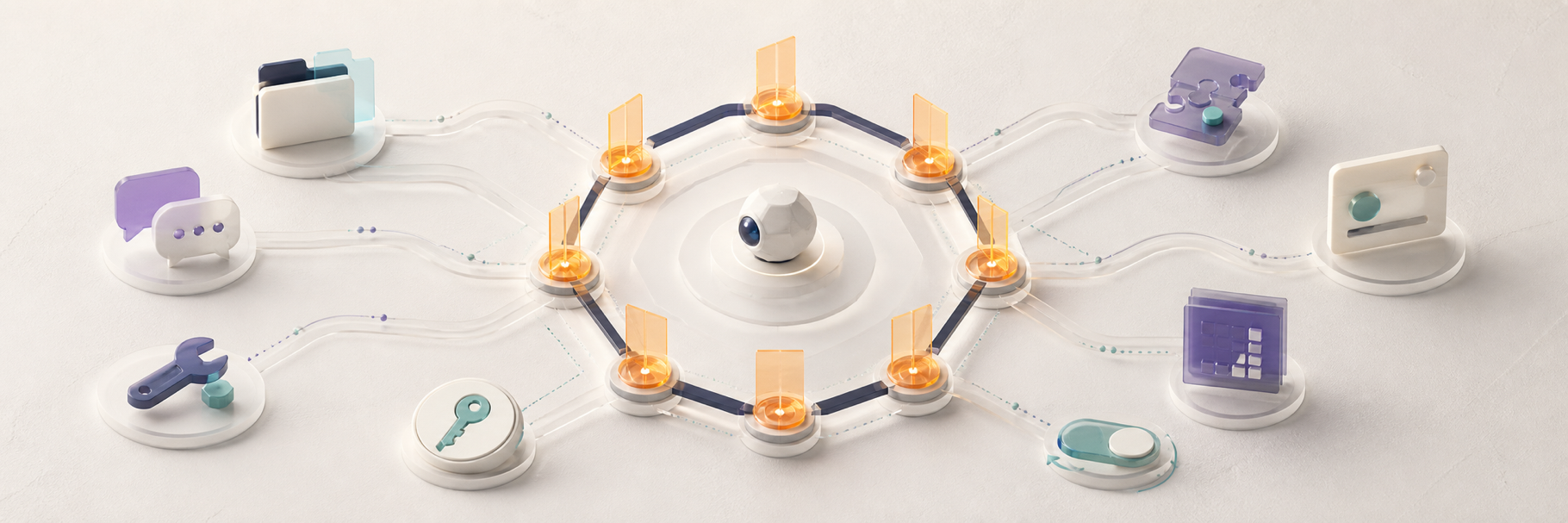
AI Agent에 access를 주기 전에 여덟 가지를 확인하세요. 누가 지시하는지, 어떤 resource에 닿는지, action이 어디서 실행되는지, credential scope, 신뢰하는 plugin, approval 대상, data와 memory의 위치, access revoke 방법입니다.
task를 완료하는 데 필요한 최소 permission부터 시작하세요. 선택지가 있다는 이유만으로 full access를 주지 마세요.
message access와 tool access를 함께 확인하는 이유
Agent는 group message, web page, email, file, tool result, plugin output에서도 input을 받습니다. 이런 입력이 다음 action에 영향을 줄 수 있습니다.
실제 risk는 input과 authority의 조합입니다. read-only Agent와 shell, browser session, private file, message 전송 권한을 가진 Agent의 영향은 다릅니다.
1. 누가 Agent와 대화할 수 있나요?
private, pairing, allowlist, team, public 중 범위를 정하고 DM과 group을 별도로 검토하세요.
OpenClaw 공식 Gateway Security guide는 identity를 먼저 정하고 pairing 또는 allowlist를 사용하라고 권합니다. 공식 Hermes Agent Security Policy도 network messaging surface에 caller authorization을 요구합니다.
2. 어떤 file과 tool에 access하나요?
필요한 capability만 나열하세요. 한 project를 읽는다고 home folder 전체가 필요하지는 않습니다.
restricted workspace, read-only 또는 filesystem access 없음부터 고려하고 shell, write, browser, automation은 필요할 때만 켜세요.
AI Agent를 하나의 folder로 제한하는 방법
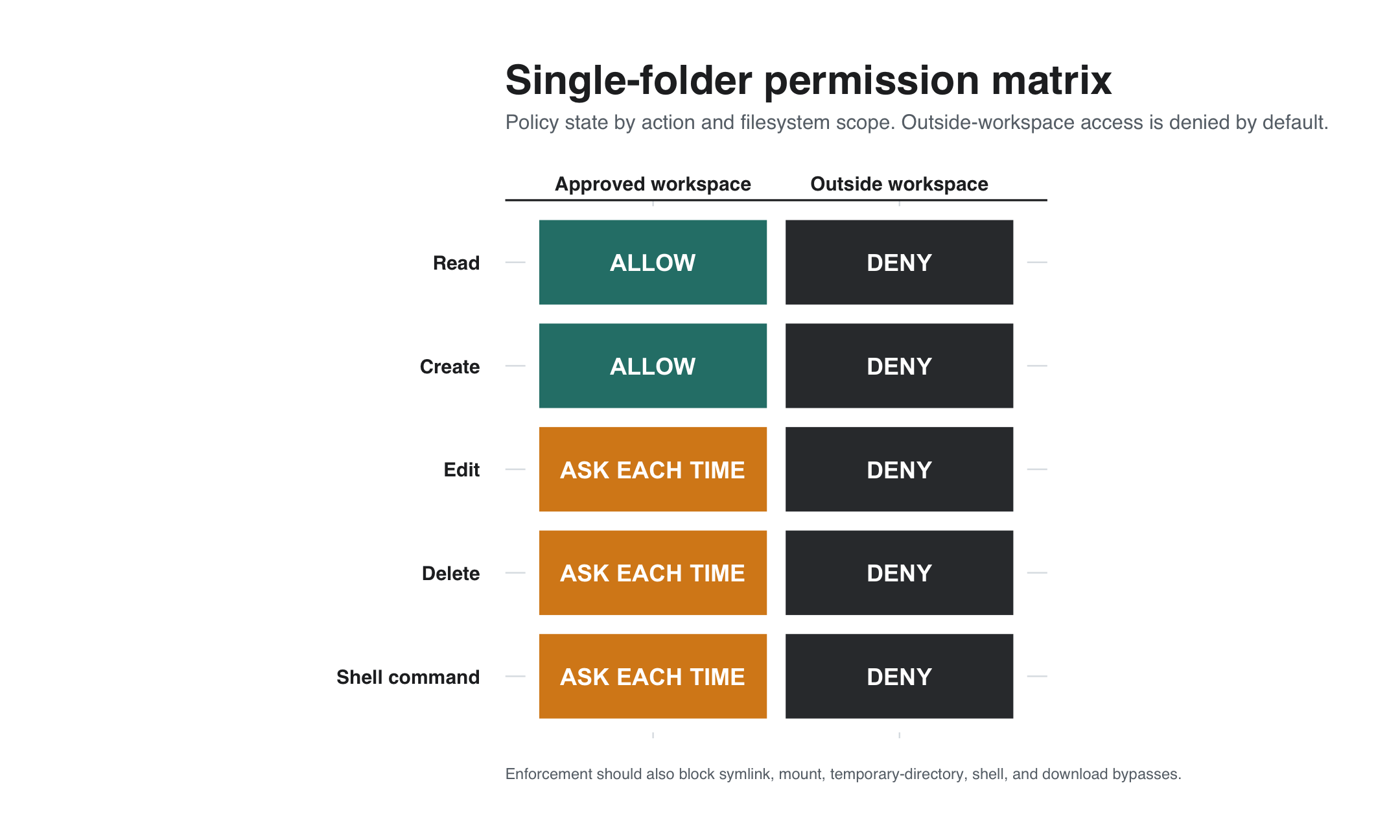
task에 필요한 file만 담은 전용 working directory를 만드세요. Agent framework와 OS에서 그 directory 밖의 path를 읽거나 수정하지 못하도록 설정하세요. 파일 확인만 필요하다면 workspace를 read-only로 노출하세요.
symlink, mount된 folder, shell command, browser download, 공유 temporary directory, workspace 안에 저장된 credential처럼 경계를 우회할 수 있는 간접 경로도 확인하세요.
실제 data를 사용하기 전에 경계를 test하세요. workspace 안의 일회용 file을 읽고, 만들고, 수정하고, 삭제한 뒤 밖에서도 같은 action을 시도하세요. 외부 action은 실패해야 하며 새 folder나 tool 추가에는 별도 approval이 필요합니다.
3. command와 code는 어디서 실행되나요?
host, tool sandbox, container, whole-process isolation 중 어디인지 확인하세요.
Hermes는 local backend가 host에서 command를 실행할 수 있고 강한 containment에는 OS-level isolation이 필요하다고 설명합니다. OpenClaw도 tool policy, sandbox, host isolation을 구분합니다.
4. 어떤 credential에 접근하나요?
model key, cloud token, SSH key, browser session, email, service account를 점검하고 불필요한 secret을 Agent host에 두지 마세요.
scope가 좁고 교체 가능한 credential을 분리해서 사용하세요.
5. 어떤 skill, plugin, connector를 신뢰하나요?
plugin은 Agent privilege로 실행될 수 있습니다. source, license, maintainer, install script, network behavior, update path를 검토하세요.
ClawChat의 OpenClaw 및 Hermes connector는 Clawling이 유지하는 독립 integration입니다. 모든 third-party plugin이 신뢰된다는 뜻은 아닙니다.
6. 어떤 action에 human approval이 필요한가요?
account 변경, publish, message 전송, 결제, 삭제, production 수정에는 approval을 사용하세요.
ClawChat의 Agent permission 문서는 지원되는 in-app action에 Ask every time, Allow, Deny를 제공합니다. Agent host의 filesystem, shell, browser, credential control을 대신하지는 않습니다.
실용적인 Allow, Ask, Deny policy
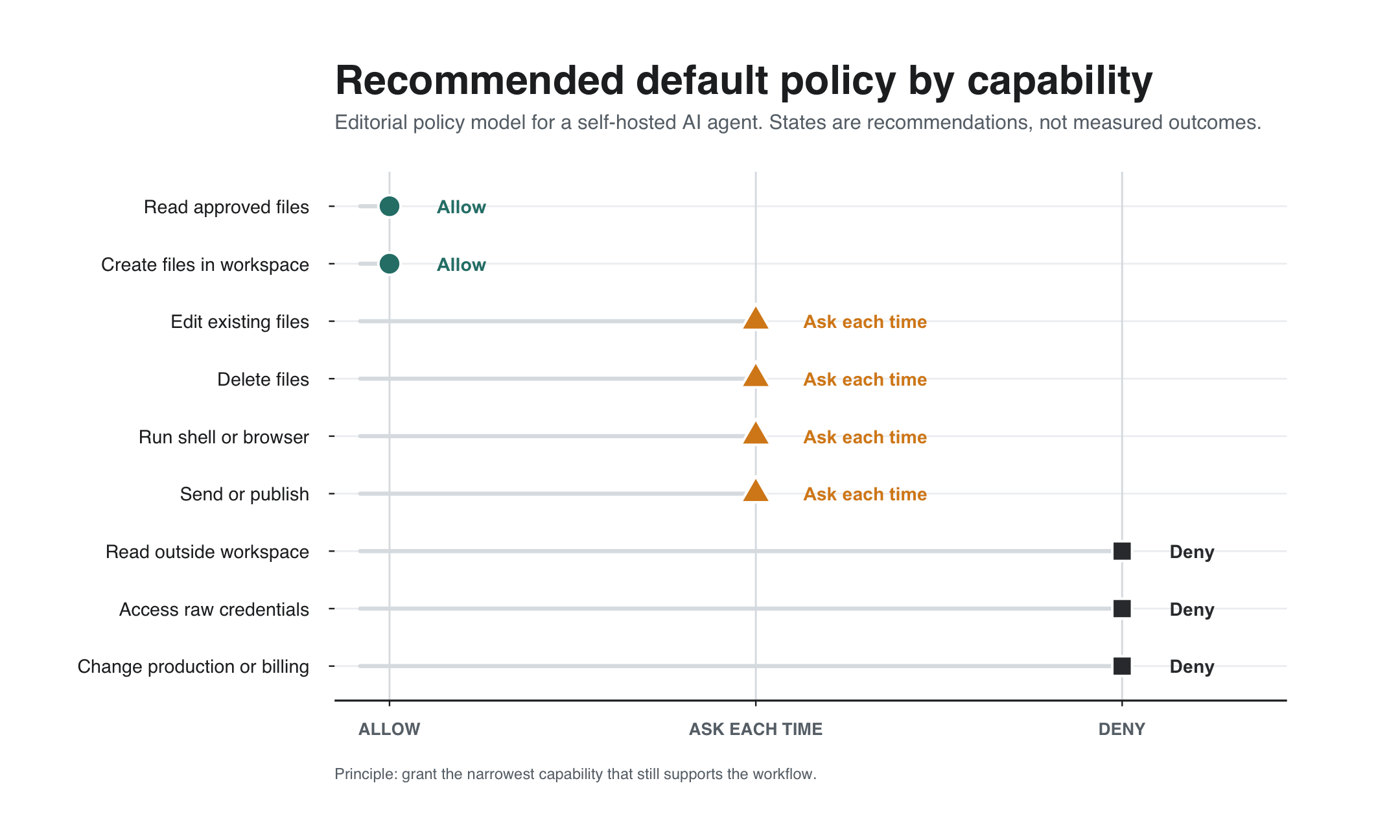
impact, reversibility, reach를 기준으로 permission을 분류하세요. 실제 workflow가 필요로 하고 경계를 test하기 전에는 capability를 Deny에서 Ask로, 또는 Ask에서 Allow로 옮기지 마세요.
- Allow: 승인된 file 읽기나 copy 변환처럼 전용 workspace 안에서 수행하는 low-impact, reversible 작업.
- Ask every time: file write 또는 delete, message 전송, publish, software install, browser action, shell command, account 변경, 새 folder access.
- Deny: 관련 없는 directory, raw credential, billing control, production system, destructive command, 되돌릴 수 없는 external action. 명확히 review된 workflow가 있을 때만 예외를 검토합니다.
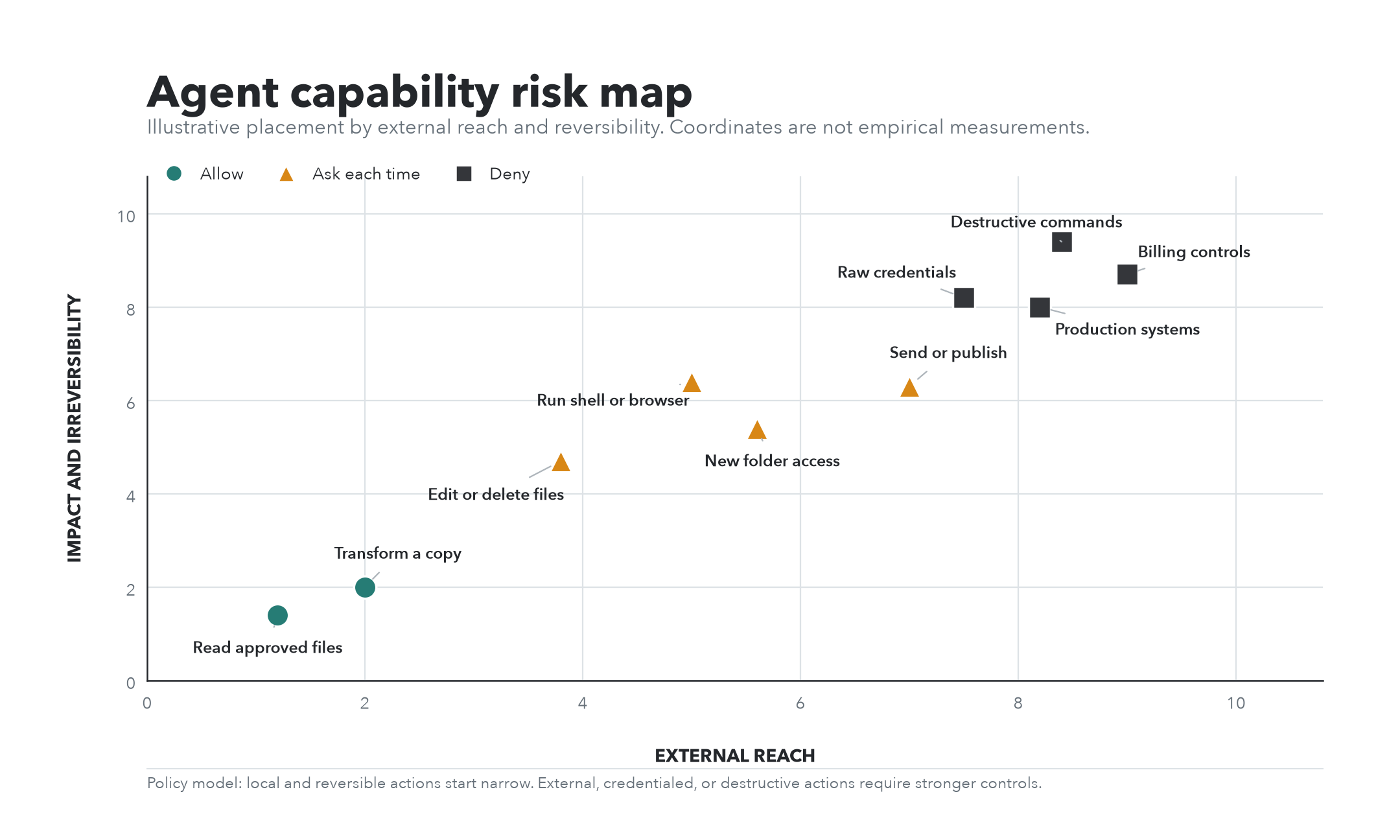
messaging approval, Agent tool policy, filesystem permission, credential scope, sandbox, OS isolation은 서로 다른 boundary를 보호하므로 모든 layer에서 같은 policy를 적용하세요.
7. message, memory, metadata는 어디로 가나요?
chat client, messaging service, connector, runtime, model provider, tool, memory store의 data path를 그려보세요.
ClawChat Privacy Policy는 service 운영 metadata를 설명하고 private Agent memory는 Agent runtime 또는 hosting provider가 보관한다고 밝힙니다. model과 host 정책도 별도로 확인하세요.
8. 어떻게 test하고 revoke하나요?
낮은 risk의 folder, account, conversation으로 test하고 deny된 action이 실패하며 unauthorized sender가 Agent를 trigger하지 못하는지 확인하세요.
process 중지, connector 비활성화, credential revoke, key rotation, pairing 또는 allowlist 삭제 방법을 알아두세요.
짧은 permission checklist
- 의도한 사람과 group만 지시할 수 있다.
- 필요한 file과 tool만 볼 수 있다.
- high-impact 실행이 적절히 isolate된다.
- credential이 분리되고 scope가 좁으며 교체 가능하다.
- skill, plugin, connector를 검토했다.
- sensitive action은 approval 또는 deny로 설정했다.
- message, model, memory, metadata 경로를 이해한다.
- deny를 test했고 access를 빠르게 revoke할 수 있다.
ClawChat에 Agent를 연결할 때
ClawChat은 conversation layer, Agent framework는 execution layer로 보세요. 대화 참여자와 host 권한을 각각 설정해야 합니다.
자주 묻는 질문
personal AI Agent에 full access를 줘야 하나요?
실제 workflow가 필요로 하고 input, isolation, credential, recovery plan이 그 권한에 맞을 때만 고려하세요.
approval prompt가 security boundary인가요?
유용한 guardrail이지만 항상 강한 containment는 아닙니다. OS-level isolation, sandbox, 좁은 credential과 함께 사용하세요.
self-hosting이 permission 문제를 해결하나요?
아닙니다. runtime control은 늘지만 host, network, credential, plugin, backup 책임도 커집니다.
의도적으로 연결하기
작은 access부터 시작해 boundary를 test하고 capability를 하나씩 추가하세요.
permission model이 명확해지면 Agent를 ClawChat에 연결하고 낮은 risk data로 첫 conversation을 확인하세요.