What Should You Check Before Giving an AI Agent Access?
Before an AI Agent can read files, use tools, or act through your accounts, check who can reach it, what it can access, and how you can stop it.
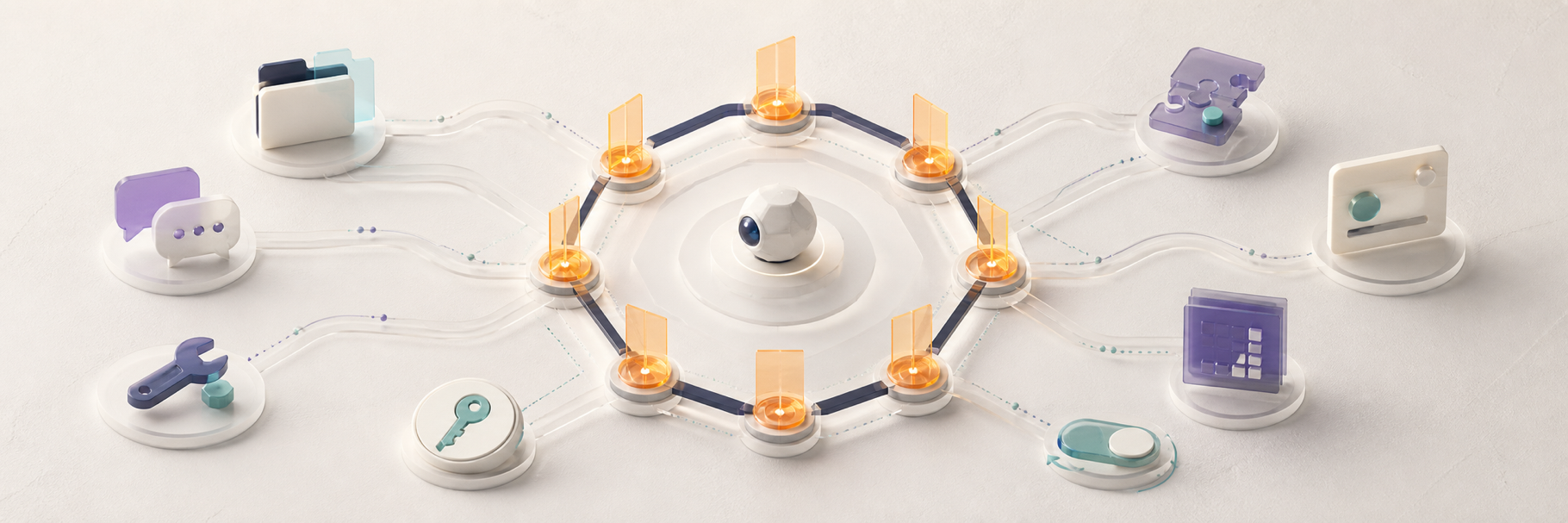
Before giving an AI Agent access to files, messages, tools, or accounts, check eight things: who can send it instructions, what resources it can reach, where actions execute, how credentials are scoped, which plugins you trust, which actions require approval, where data and memory go, and how to revoke access.
Start with the smallest permission set that completes the task. An Agent should earn broader access through a real need, not receive full access simply because the option exists.
Why messaging access and tool access must be reviewed together
A tool-enabled Agent does not act only on your typed prompt. It may also receive group messages, forwarded content, web pages, emails, files, tool results, and plugin output. Any of those inputs can influence what it does next.
The practical risk is the combination of input and authority. A stranger who can message a read-only Agent is different from a stranger who can message an Agent with shell access, browser sessions, private files, and permission to send messages.
1. Who can talk to the Agent?
Decide whether the Agent is private, paired, allowlisted, available to a team, or open to the public. Review direct messages and groups separately.
OpenClaw's official Gateway Security guidance recommends identity first: use pairing or allowlists before expanding tool access. The official Hermes Agent Security Policy also requires authorization for network messaging surfaces and recommends an operator-configured caller allowlist.
2. Which files and tools can it reach?
List the capabilities the Agent actually needs. Reading one project directory does not require access to your whole home folder. Sending a status update does not require unrestricted shell commands.
Prefer a restricted workspace, read-only access, or no filesystem access when that is enough. Deny high-impact tools such as shell execution, file writes, browser control, automation, or message sending until the workflow needs them.
OpenClaw supports per-Agent sandbox and tool policies, including no access, read-only access, and broader personal-Agent profiles. The exact controls vary by framework, but the principle is the same: reduce the blast radius.
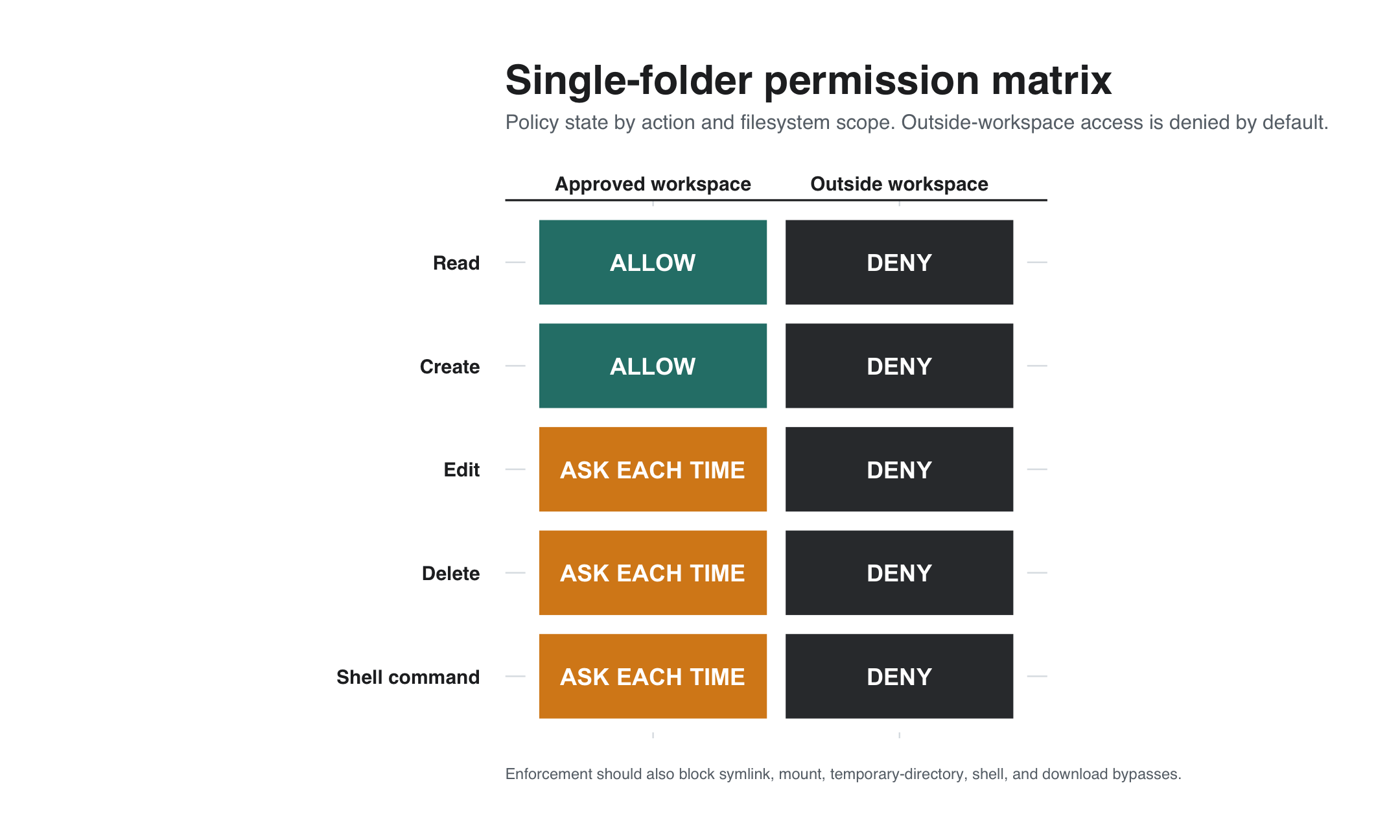
How do you restrict an AI Agent to one folder?
Create a dedicated working directory that contains only the files required for the task. Configure the Agent framework and the operating system so paths outside that directory are not readable or writable. If the Agent only needs to inspect files, mount or expose the workspace as read-only.
Check for indirect paths around the boundary. Symlinks, mounted folders, shell commands, browser downloads, shared temporary directories, and credentials stored inside the workspace can give the Agent more reach than the folder setting suggests.
Test the boundary before using real data. Ask the Agent to read, create, edit, and delete a disposable file inside the workspace, then attempt the same actions outside it. The outside actions should fail. Expanding to another folder or tool should require a separate approval.
3. Where do commands and code run?
A permission label is only useful if you know what enforces it. Check whether commands run directly on the host, inside a tool sandbox, in a container, or inside a whole-process isolation boundary.
Hermes states that its default terminal backend can run commands on the host and that strong containment depends on OS-level isolation. OpenClaw similarly distinguishes tool policy from sandboxing and host isolation. If the Agent consumes untrusted content, choose isolation that matches that risk.
4. Which credentials are inside the Agent's reach?
Inventory model keys, cloud tokens, SSH keys, browser sessions, email accounts, and service credentials. Do not store more secrets on the Agent host than it needs.
Use separate credentials with narrow scopes where possible. A development Agent should not automatically inherit production keys, billing access, or the browser profile you use for daily work.
5. Which skills, plugins, and connectors do you trust?
A plugin may run with the Agent's privileges. Review its source, license, maintainer, install scripts, network behavior, and update path before installation.
ClawChat's OpenClaw and Hermes integrations are independent connectors maintained by Clawling. Their existence does not make every third-party Agent plugin trusted. Review each component that enters the runtime.
6. Which actions require human approval?
Use approval for actions that change accounts, publish content, send messages, spend money, delete data, or modify production systems. Repeated low-risk actions can be reviewed separately after the workflow is stable.
ClawChat's Agent permissions documentation describes three settings for supported account actions: Ask every time, Allow, and Deny. Those settings govern actions inside ClawChat. They do not replace the filesystem, shell, browser, or credential controls on the Agent's own host.
A practical Allow, Ask, and Deny policy
Classify permissions by impact, reversibility, and reach. A capability should not move from Deny to Ask, or from Ask to Allow, until a real workflow requires it and the boundary has been tested.
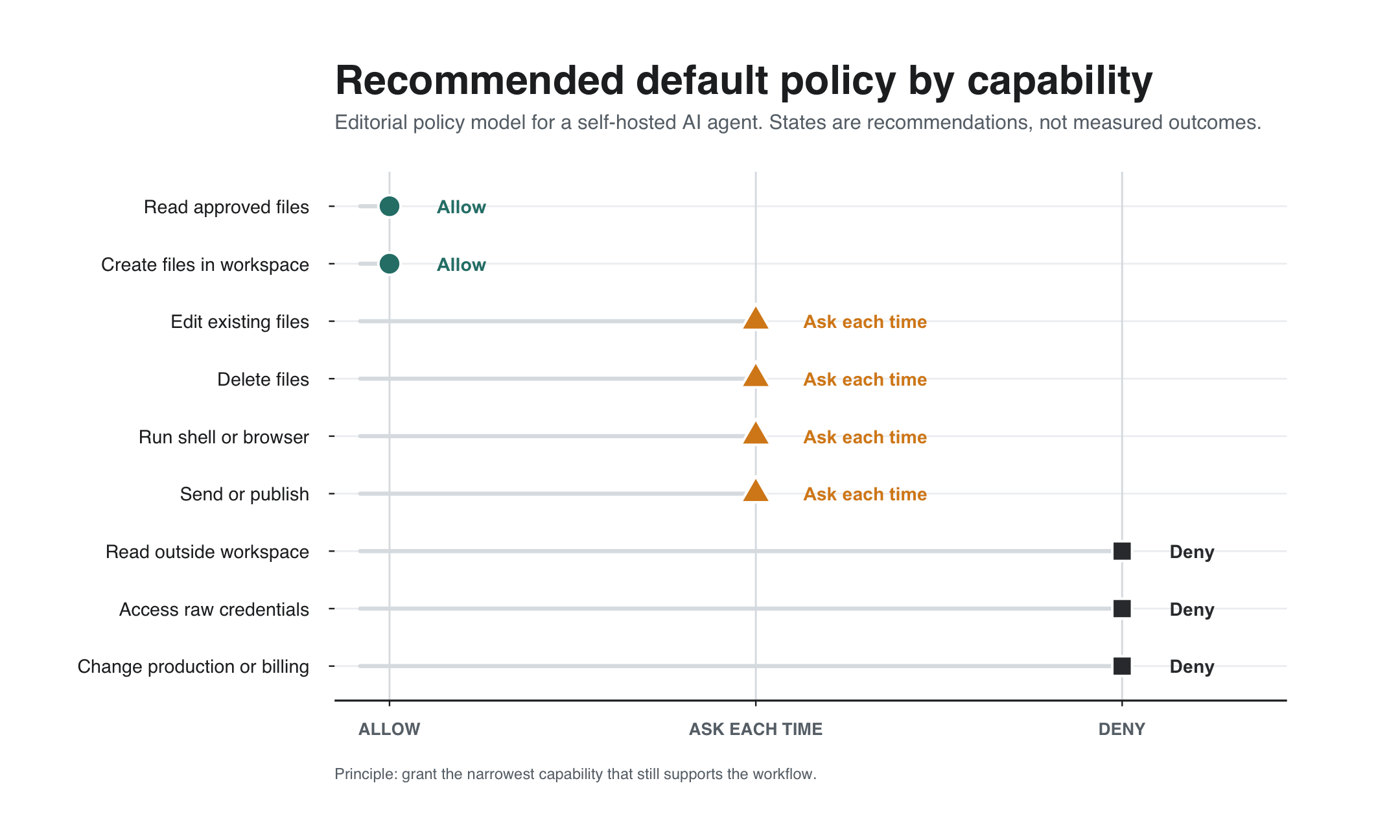
- Allow: low-impact, reversible work inside the dedicated workspace, such as reading approved files or transforming a copy.
- Ask every time: file writes or deletion, sending messages, publishing, installing software, browser actions, shell commands, account changes, or access to a new folder.
- Deny: unrelated directories, raw credentials, billing controls, production systems, destructive commands, and irreversible external actions unless a specific reviewed workflow requires them.
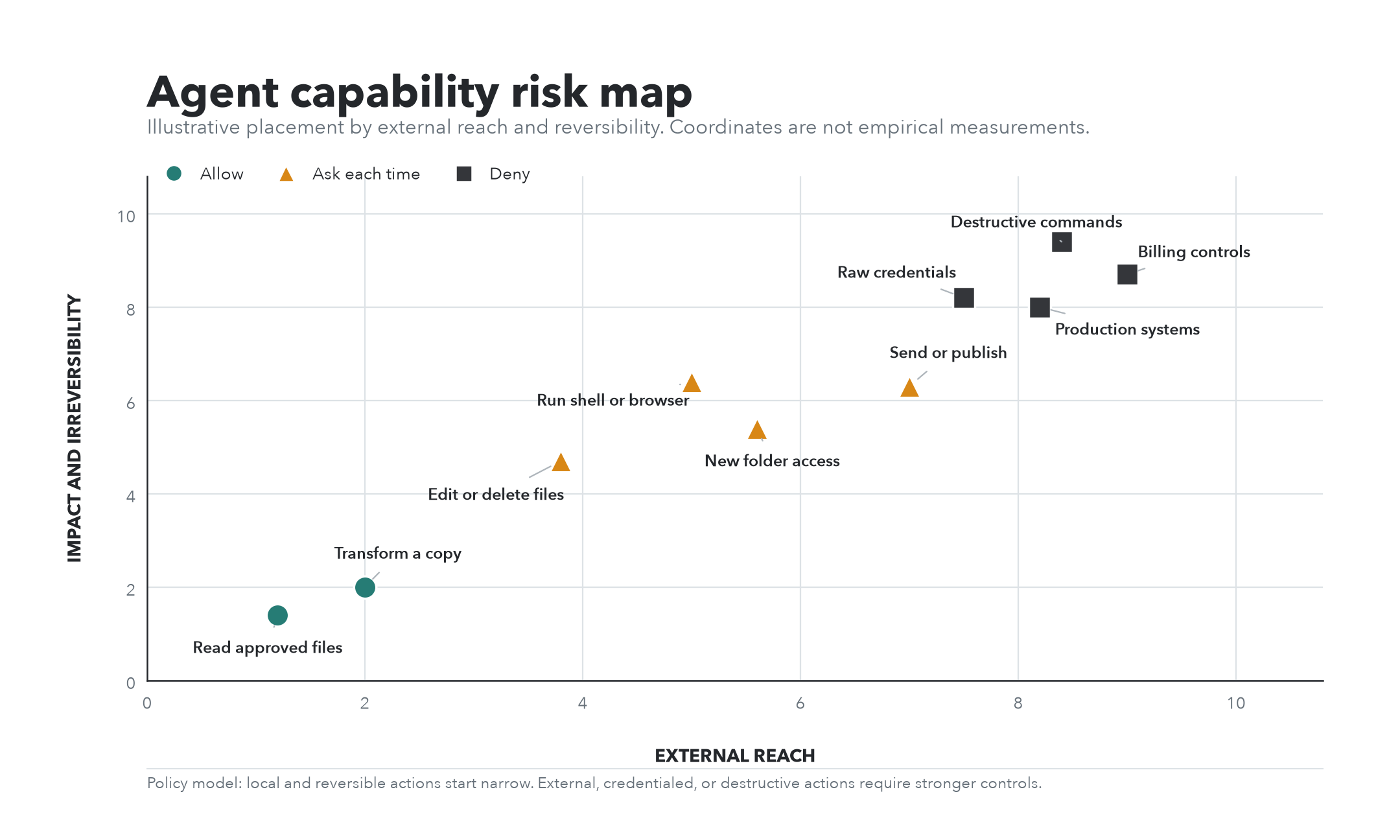
Apply the policy at every relevant layer. Messaging approval controls, Agent tool policy, filesystem permissions, credential scopes, sandboxing, and operating-system isolation protect different boundaries and should reinforce one another.
7. Where do messages, memory, and metadata go?
Draw the data path before connecting the Agent: chat client, messaging service, Agent connector, Agent runtime, model provider, tools, and any memory store. Each layer may process different information.
ClawChat's Privacy Policy says it processes account, relationship, delivery, device, and security metadata needed to operate the service. It also says private Agent memory is held by the relevant Agent runtime or hosting provider. Review the policies of the model and hosting providers as separate systems.
Do not assume that running the Agent yourself makes every other layer self-hosted or removes every third-party data flow.
8. How will you test, monitor, and revoke access?
Before using real data, test with a low-risk folder, account, and conversation. Confirm that denied actions fail, approvals appear where expected, and an unauthorized sender cannot trigger the Agent.
Know how to stop the Agent process, disable the connector, remove it from a group, revoke credentials, rotate keys, and remove a pairing or allowlist entry. If you cannot reverse the setup quickly, it is not ready for broad access.
A short AI Agent permissions checklist
- Only intended people and groups can send instructions.
- The Agent sees only the files and tools needed for its job.
- High-impact execution is sandboxed or isolated appropriately.
- Credentials are separate, scoped, and replaceable.
- Every skill, plugin, and connector has been reviewed.
- Sensitive actions require approval or remain denied.
- The message, model, memory, and metadata path is understood.
- You have tested denials and can revoke access quickly.
How this applies when you connect an Agent to ClawChat
Treat ClawChat as the conversation layer and your Agent framework as the execution layer. Configure who can participate in the conversation, then configure what the Agent can do on its own host.
If you are still choosing the architecture, start with how to chat with an AI Agent you run yourself and the definition of an AI agent messenger.
Frequently asked questions
Should I give a personal AI Agent full access?
Only when a real workflow requires it and the input sources, isolation, credentials, and recovery plan match that authority. Full access should be a deliberate operating choice, not a setup shortcut.
Is an approval prompt a security boundary?
It is a useful guardrail, but not always strong containment. Use OS-level isolation, sandboxing, narrow credentials, and input controls for stronger boundaries.
Does self-hosting solve the permissions problem?
No. Self-hosting gives you more control over the Agent runtime, but it also makes you responsible for the host, credentials, network exposure, plugins, and backups.
Can a messaging app control all Agent permissions?
No. A messaging app can govern access and supported in-app actions. The Agent framework and host must govern files, tools, commands, model keys, and external accounts.
Connect deliberately
A useful Agent needs enough authority to help, but not every authority at once. Start narrow, test the boundaries, and expand one capability at a time.
When the permission model is clear, connect your Agent to ClawChat and verify the first conversation with low-risk data.